



How to Approve a Custom Product Proof Before Production
The Approval Stage Is Where Most Promotional Product Mistakes Happen
Over the years, we've seen the same situation play out more times than we'd like. A customer approves a proof, production begins, and when the finished order arrives, it doesn't match what they expected. The dimensions are off. The logo is smaller than anticipated. The colors shifted in print. At that stage, with production complete and the order customized, there's very little anyone can do.
Understanding how to approve a proof for promotional products properly is one of the most valuable things a buyer can learn. The proof approval process is the last point in the project where changes are free, fast, and consequence-free. Once you give the green light, the order moves into final production, and the artwork proof approval becomes a binding agreement. What to check before approving a proof isn't complicated, but it requires more than a quick glance at whether the logo looks right.
This guide walks through every stage of the custom product proof approval process, what to check before approving a proof at each step, and what each element means before moving forward.
What a Digital Proof Actually Shows You
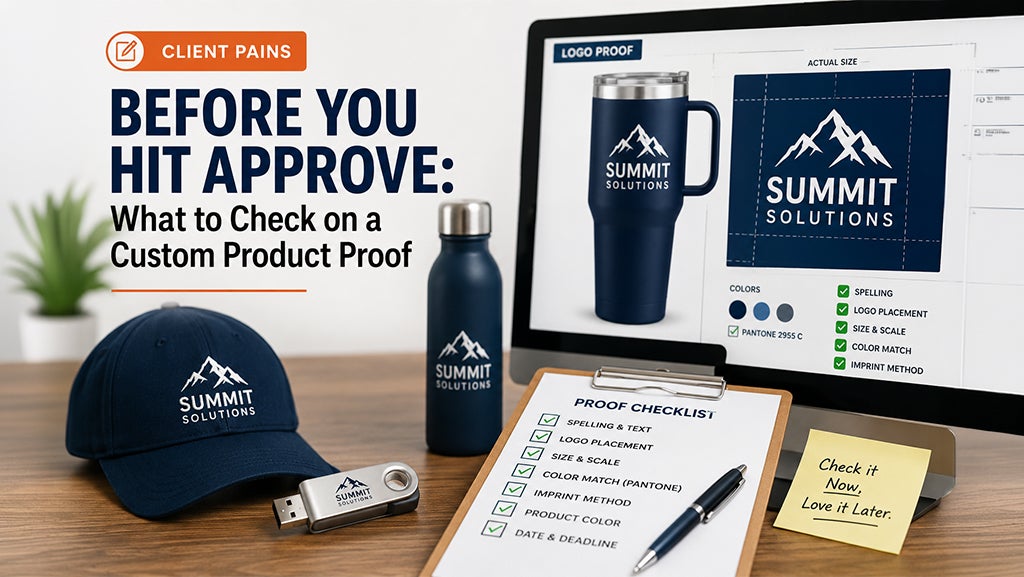
A digital proof promotional products buyers receive is a visual representation of how your finished product will look before anything goes to print. It places your artwork into a mock up of the actual item you ordered, showing logo placement proof, text placement, design specifications, and the imprint area promotional products carry relative to the product itself. It is the closest thing to the final product you will see before production begins.
What a digital proof does not automatically show you is every specification that matters. Dimensions are listed on the product page, not always on the art proof itself. Color accuracy on screen depends on your monitor's calibration and doesn't always match how ink or embroidery will render on the physical item. A proof is a layout document, not a guarantee of outcome. Understanding what it includes and what it doesn't is the foundation of a useful review.
Most companies send proofs via email with a link to approve or request changes online. Some use annotation tools that allow you to comment directly on the file. Others send a PDF for review and ask for feedback by reply. Whatever the format, the review process is the same. Go through every element systematically before you approve, and request a new proof for any change rather than assuming it will be handled in production.
Recent improvements to our product pages:
-
FAQ sections added to most product pages to help you find key specifications before placing an order
-
Enhanced and unified materials extraction and filtering across the catalog
-
Ongoing data quality improvements to ensure more accurate product information and search results
Check the Dimensions First
Product size promotional products carry is the most common source of disconnect between what a customer expected and what arrives. A digital proof shows your artwork scaled to the product, but if you haven't verified the actual dimensions of the item, the proof can look perfectly proportioned and still result in a product that doesn't work for its intended purpose.
Before you approve a custom product proof, pull up the product page and confirm the physical dimensions of the item. Cross-reference those dimensions against your use case. A bag needs to hold what you plan to put in it. A sign needs to be legible at the distance it will be read from. An apparel item needs to fit the people wearing it. These are verifications that have to happen before the final approval, not after the order lands on your desk.
If the dimensions aren't listed on the proof itself, ask your sales contact to add them before you approve proof custom merchandise. This is a standard request and takes minutes to action. Approving a proof without confirmed dimensions means accepting the product as specified on the product page, which may or may not match your expectations. Verify first, approve second.
Recent improvements to size information on our site:
-
Enhanced size extraction and standardization across products
-
Improved size-based search filters for more accurate product discovery
Verify the Imprint Area
The imprint area is the defined space on a product where artwork can be applied. It varies by product, decoration method, and manufacturer. A full-color print on a tote bag has a different imprint area than an embroidered logo on a polo shirt or a laser engraving on a drinkware piece. Understanding the imprint area on your specific item tells you how large your logo will actually appear on the finished product.
On the art proof, verify that your logo placement sits where you intended it and that the size of the imprint area matches your expectations. A logo that looks substantial on a proof can read as small in person if the imprint area is limited. If the placement or size doesn't look right, request changes before approving. Revisions at this stage are part of the artwork approval process and come at no cost. Changes requested after approval are a different conversation.
Check text placement with the same attention. Any copy on the product, whether it's a tagline, a web address, a date, or an event name, needs to be legible at the actual size it will be printed or embroidered. Zoom out on the proof to approximate how the item will look at arm's length. If you have to squint to read it on screen, it will be harder to read in person.
Recent improvements to decoration method information:
-
Standardized decoration method terminology and classifications across the catalog
-
Enhanced decoration method filters to help you find products by imprint type more easily
Check Colors Against Your Brand Guidelines
Color accuracy is one of the most technical elements of the artwork approval process, and one of the most frequently overlooked. What you see on screen is an RGB representation of a color. What gets printed, embroidered, or engraved is produced through a different process entirely, and the two don't always match without deliberate calibration.
If your brand has defined Pantone colors, include those in your artwork file and confirm with your sales contact that the decoration method supports Pantone matching. Screen printing and embroidery can match Pantone references closely when set up correctly. Full-color digital printing works in CMYK and produces results that may vary from your on-screen preview. Knowing which process applies to your order tells you what level of color accuracy to expect and what questions to ask before giving final approval.
If color accuracy is critical to your brand, request a pre-production sample before approving for full production. A physical sample removes the ambiguity of screen-based color review and gives you a definitive point of comparison. It adds time and a small cost to the process, but it eliminates the risk of a full production run in the wrong color.
Request a Pre-Production Sample When It Matters
A pre-production proof, also called a spec sample or physical proof, is a single imprinted unit produced before the full order goes into production. It is the most reliable way to verify how a product will look and feel before committing to a full run. Not every order needs one, but some orders benefit significantly from the investment.
Pre-production samples make sense when the order is large, when the product is being used at a high-visibility corporate event, when color accuracy is critical, or when the product hasn't been ordered from that supplier before. The cost of a pre-production sample is small relative to the cost of receiving a full order that doesn't meet expectations. For clients ordering thousands of units for a major event, the ability to physically review the product before production begins is worth the time it adds to the timeline.
Requesting a sample also gives stakeholders within your team a chance to review the product before the order is locked. A creative director, a brand manager, or an event coordinator may catch something in a physical sample that doesn't surface in a digital review. Getting internal sign-off at the sample stage can save time, money, and difficult conversations later in the process.
What Happens After You Approve
Once you approve a proof, production begins. The artwork approval is the green light that moves your order from the design stage into manufacturing. At that point, the customization process is underway and changes are no longer available without significant cost and delay implications.
The practical consequence of final approval is that you are held responsible for the artwork as shown in the proof. If a spelling error, a wrong color, or an incorrect placement wasn't caught before approval, the order will be produced as approved. This is standard practice across the promotional products industry and is the reason the review stage exists in the first place. The proof workflows companies build around the approval process are designed to give buyers every opportunity to catch errors before they become production problems.
After approval, you'll typically receive an email notification confirming that your order is in production along with an estimated ship date. From there, production time runs independently of weekends, holidays, and shipping transit. If your order has a hard deadline, confirm the production timeline with your sales contact before approving rather than assuming the in-hands date is guaranteed. Any proof revisions or delays in the approval process push the production start date, which pushes the delivery date. Building review time into your project schedule from the beginning is the most reliable way to ensure your order arrives when you need it.
A Proof Review Takes Ten Minutes and Saves Weeks
The companies that move through the promotional products process without surprises are the ones that treat proof review as a deliberate step, not a formality. They check dimensions against the product spec. They verify imprint area and logo size. They confirm colors against brand guidelines. They request changes when something isn't right rather than approving and hoping for the best.
Logotech's team reviews every proof before it's sent and flags issues before they reach the customer. We remain committed to continuously improving our website and product data to make finding the right promotional products easier and more efficient. But the final review belongs to the buyer, because only you know exactly how the product will be used, who will receive it, and what it needs to accomplish. Take the ten minutes. Check every element. Approve with confidence.
If you have questions about any part of the proof approval process before placing your next order, contact our team directly. We're here to make sure what you approve is exactly what you receive.